Enterprise Deployment Plan
The Enterprise Plan is designed for high-traffic, enterprise-grade applications that require automatic scaling to handle unpredictable traffic patterns and request volumes.
This plan operates on a pay-as-you-go pricing model with dynamic resource allocation that automatically adjusts based on demand.
Overview
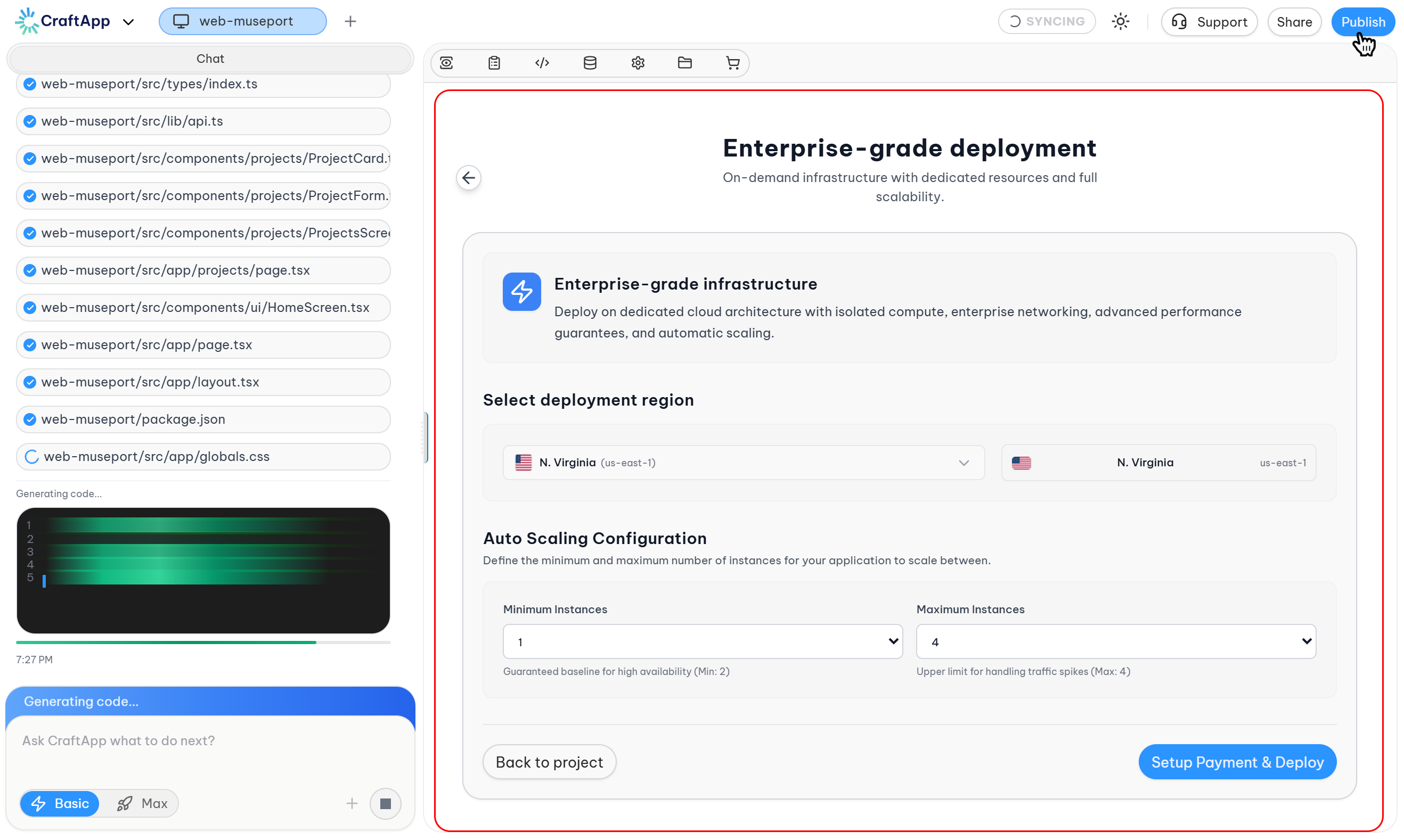
The Enterprise Plan provides dedicated cloud architecture with:
- Isolated compute resources
- Enterprise networking
- Advanced performance guarantees
- Automatic scaling capabilities
- High availability infrastructure
All resources (CPU, RAM, instances) are managed dynamically and scale automatically based on real-time traffic demands.
Intended Use Cases
- High-traffic enterprise applications
- Applications with unpredictable traffic patterns
- Production systems requiring high availability
- Mission-critical workloads
- Applications with variable scaling requirements
- Large-scale SaaS platforms
- Web and mobile application deployments
Eligibility Requirements
The Enterprise Plan is not available by default.
Requirements:
- Active Pro Plan usage for a minimum of 3 months
- Account in good standing
Note
This requirement ensures applications are tested and stable on dedicated infrastructure before transitioning to auto-scaling architecture.
Accessing Enterprise Deployment
To access the Enterprise Plan:
- Open the project in Craftapp Studio.
- Click the Publish button in the top navigation bar.
- Review the three available deployment options.
- If eligible, select the Enterprise Plan by clicking Start Scaling.
This navigates to the Enterprise deployment configuration page.
Enterprise Deployment Configuration
Page Header
At the top of the configuration page, the following information is displayed:
Title: Enterprise-grade infrastructure
Description: Deploy on dedicated cloud architecture with isolated compute, enterprise networking, advanced performance guarantees, and automatic scaling.
1. Select Deployment Region
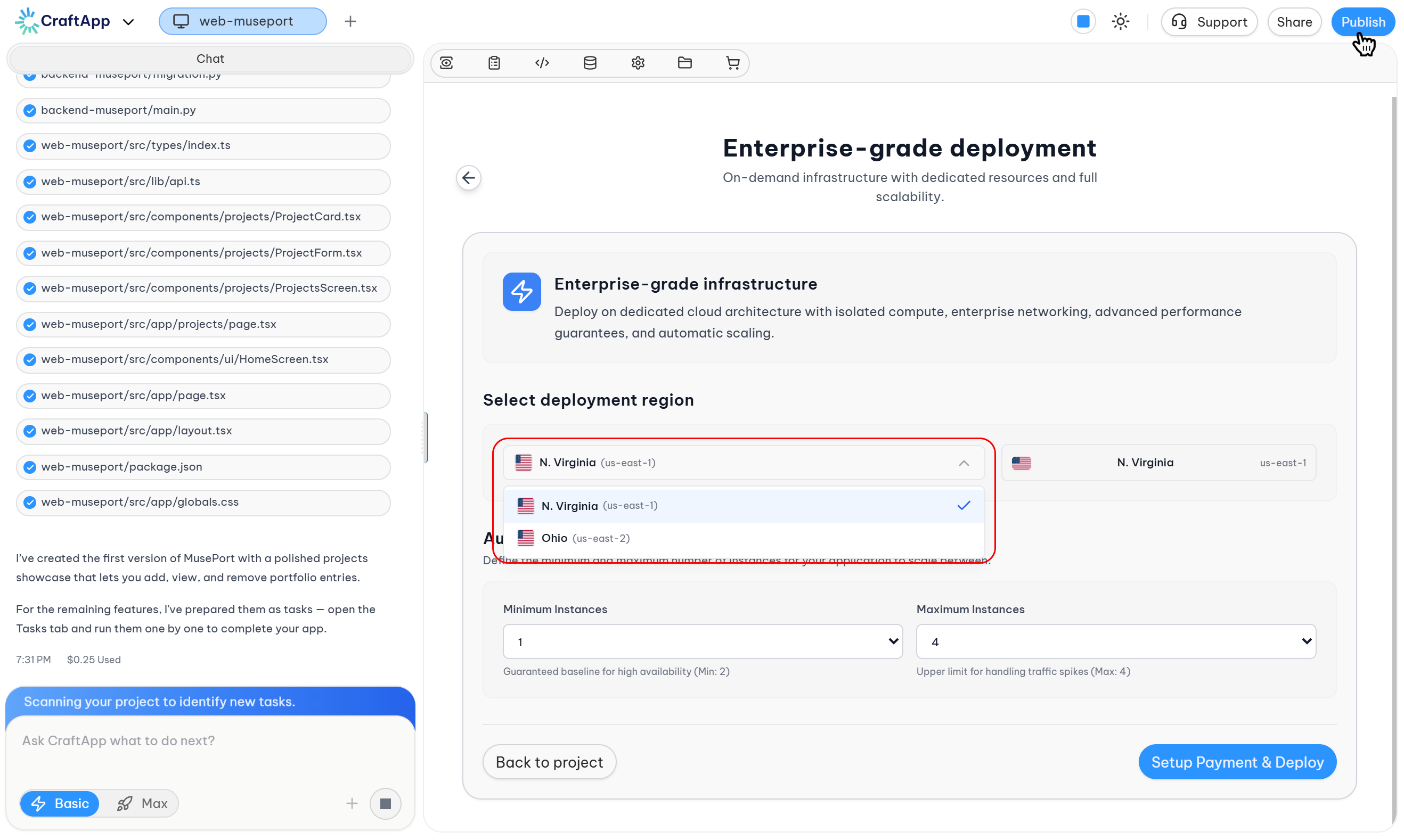
Section: Select Deployment Region
Available Regions:
| Region | Location |
|---|---|
| Virginia | United States (East Coast) |
| Ohio | United States (Midwest) |
Selection Guidance:
- Choose the region closest to your target user base
- Consider data residency requirements
- Region affects application latency
Tip
For North American users, Virginia is typically optimal for East Coast traffic, while Ohio serves Midwest and Central traffic efficiently.
2. Auto Scaling Configuration
Section: Auto Scaling Configuration
Description: Define the minimum and maximum number of instances for your application to scale between.
The auto-scaling system dynamically adjusts the number of active instances based on real-time traffic demands, ensuring optimal performance during traffic spikes and cost efficiency during low-traffic periods.
Minimum Instances
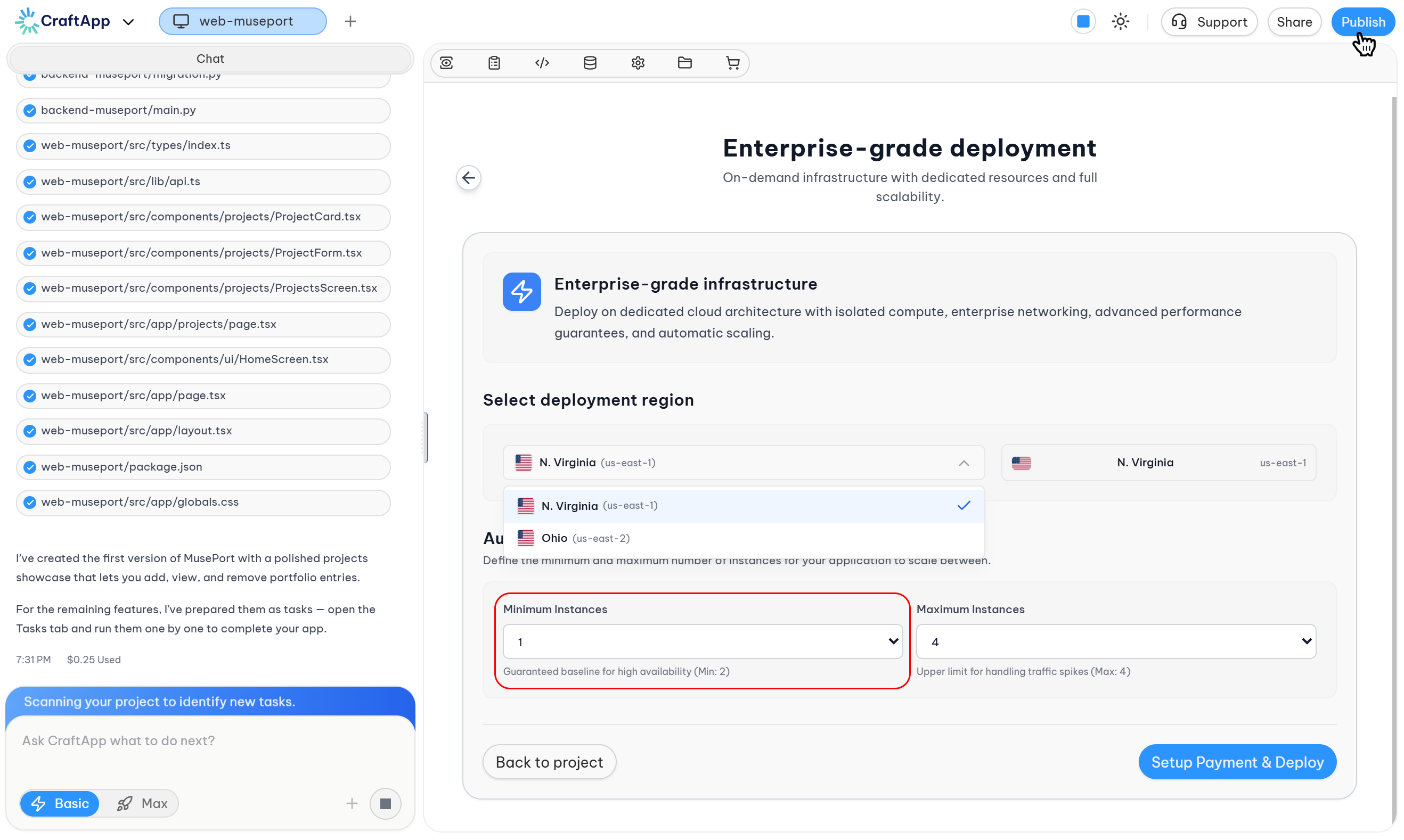
Input Field: Minimum Instances
Default Value: 1
Description: Guaranteed baseline for high availability (Min: 2)
Purpose:
- Ensures a minimum number of instances are always running
- Provides baseline high availability
- Prevents complete service interruption during instance failures
Note
For true high availability, a minimum of 2 instances is recommended. This ensures redundancy if one instance fails.
Maximum Instances
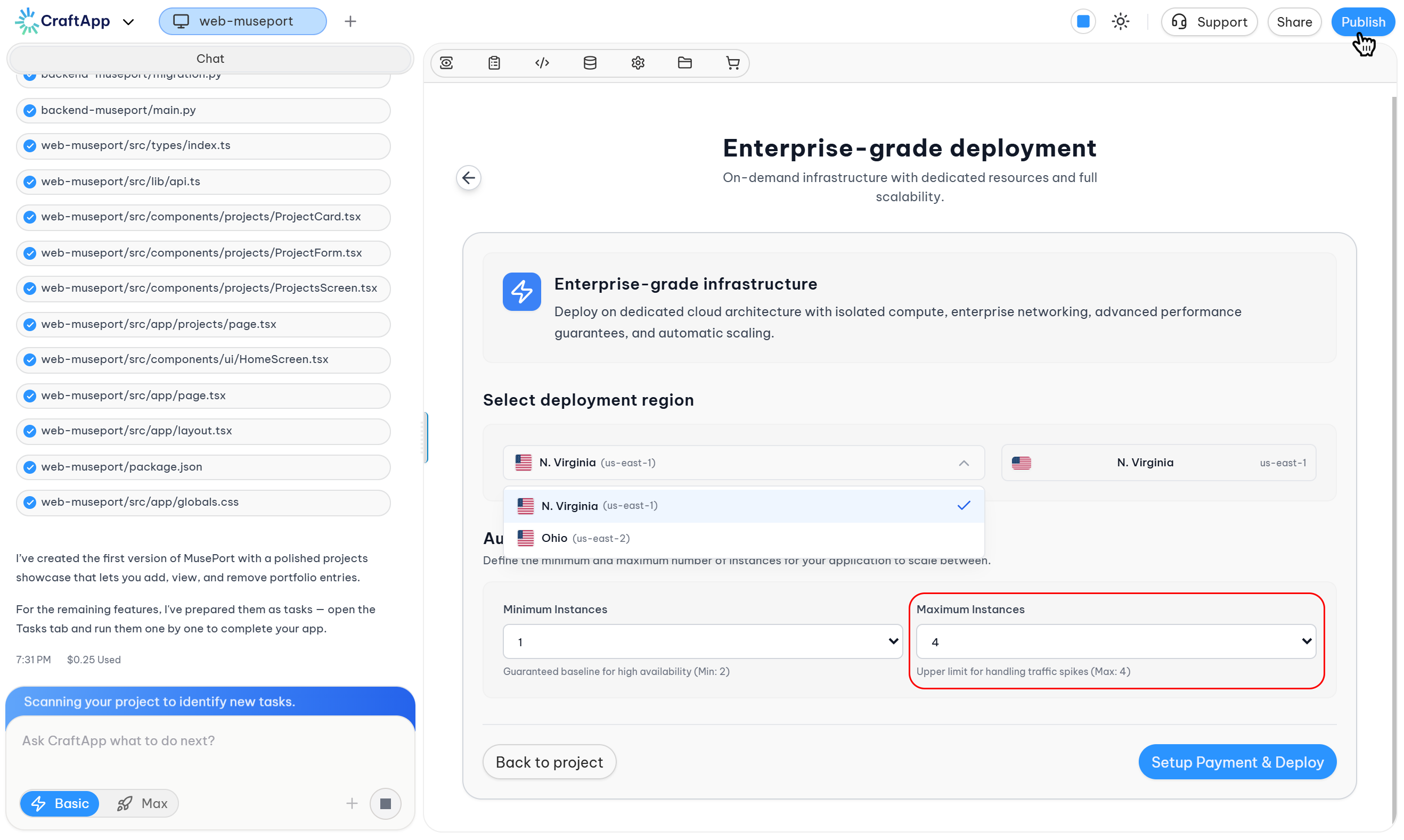
Input Field: Maximum Instances
Default Value: 4
Description: Upper limit for handling traffic spikes (Max: 4)
Purpose:
- Defines the maximum number of instances the system can scale to
- Prevents unexpected cost overruns
- Ensures sufficient capacity for peak traffic periods
Note
The maximum instance limit can be adjusted based on expected traffic patterns. Contact support for higher limits if required.
3. App Store Publishing (Mobile Only)
Section: App Store Publishing
This section appears only for mobile application projects. It allows selection of distribution platforms for publishing the application.
Available Platforms:
| Platform | Store | Description |
|---|---|---|
| Android | Google Play Store | Publish directly to the Google Play Store |
| iOS | Apple App Store | Publish directly to the Apple App Store |
Selection Method:
- Platforms are selectable by clicking on the desired option
- Users can select one platform or both platforms simultaneously
Selection Options:
- Android Only: Publishes to Google Play Store
- iOS Only: Publishes to Apple App Store
- Both Platforms: Publishes to both Google Play Store and Apple App Store
Note
For enterprise mobile deployments, both platforms are recommended to maximize reach and ensure consistent user experience across devices.
4. Cost Summary
Section: Cost Summary
Displays estimated costs based on:
- Selected region
- Minimum instances configuration
- Maximum instances configuration
- Auto-scaling usage estimates
- Selected distribution platforms (for mobile apps)
Cost Components:
- Base infrastructure cost (minimum instances)
- Variable scaling cost (based on actual usage between min and max)
- Data transfer costs
- Storage costs
- App Store publishing fees (for mobile deployments, if applicable)
Costs are calculated on a pay-as-you-go basis and billed based on actual resource consumption.
5. Action Buttons
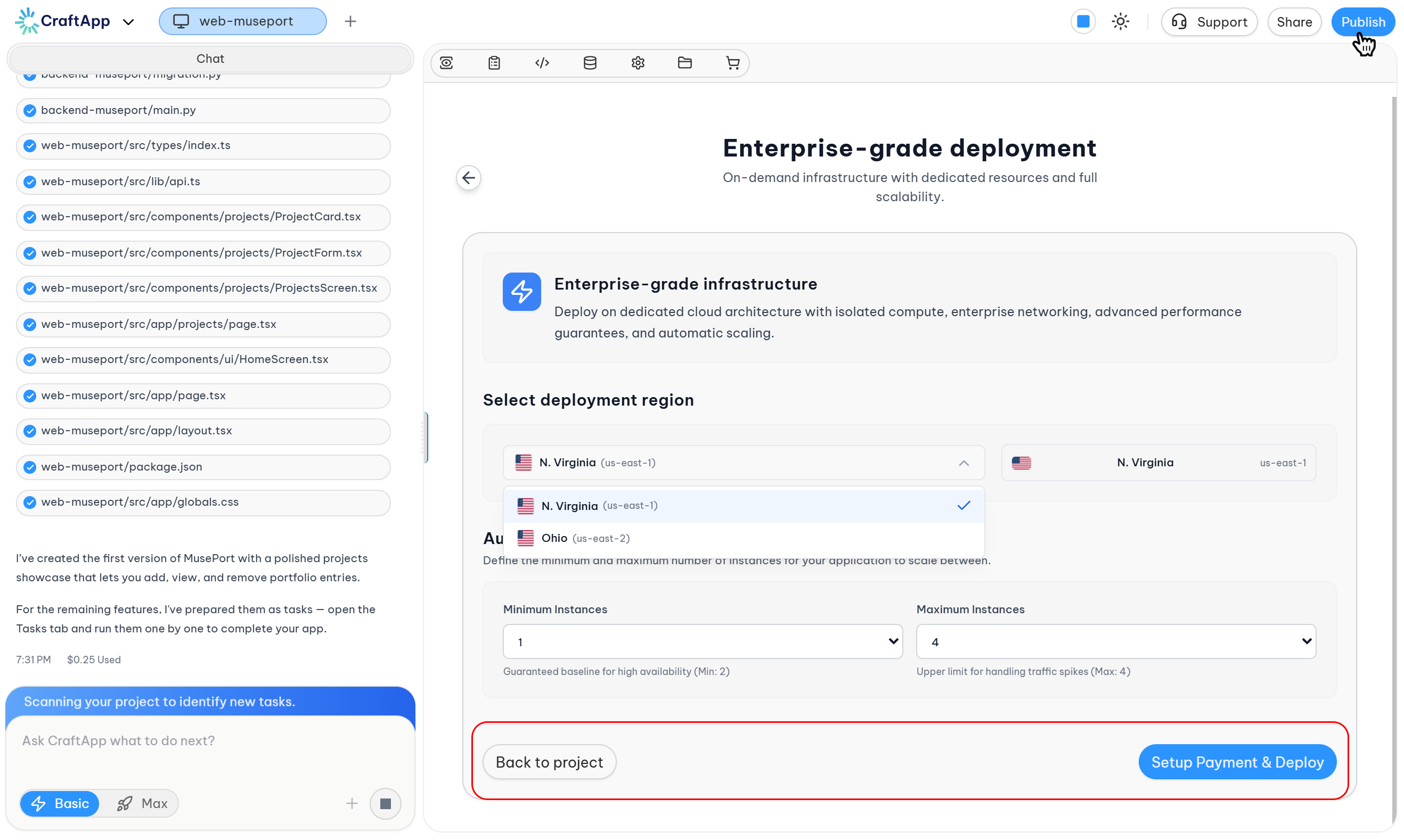
At the bottom of the configuration page:
| Button | Function |
|---|---|
| Back | Returns to the main deployment options page |
| Setup Payment & Deploy | Proceeds to payment configuration and initiates deployment |
Deployment Process
Once configuration is complete:
- Review the selected region.
- Verify minimum and maximum instance settings.
- Select distribution platforms (for mobile apps).
- Click Setup Payment & Deploy.
- Complete payment configuration.
- Deployment begins automatically after payment setup.
Deployment Duration:
- Deployment time varies based on project complexity
- Enterprise infrastructure provisioning may take longer than other plans
- Mobile app store publishing may require additional processing time
- Progress can be monitored in real-time
Auto-Scaling Behavior
The Enterprise Plan automatically manages resources based on:
Scale Up Triggers:
- Increased traffic volume
- Higher request rates
- CPU utilization thresholds
- Memory usage thresholds
- Custom metrics (if configured)
Scale Down Triggers:
- Decreased traffic volume
- Lower request rates
- Sustained low resource utilization
- Scheduled low-traffic periods
Scaling Process:
- New instances are provisioned automatically
- Instances are removed when no longer needed
- Scaling occurs without manual intervention
- No downtime during scaling operations
High Availability Features
The Enterprise Plan includes:
- Redundant Infrastructure: Multiple instances ensure continuous availability
- Automatic Failover: Traffic is redirected if an instance fails
- Load Balancing: Requests are distributed across active instances
- Health Monitoring: Instances are continuously monitored for issues
- Automatic Recovery: Failed instances are replaced automatically
Error Handling
If the project encounters issues during deployment:
- An AI Fix option will appear.
- Click the AI Fix button to allow Craftapp to resolve the issue.
- Once resolved, click Republish to restart deployment.
Pricing Model
The Enterprise Plan operates on a pay-as-you-go model:
- Base Cost: Minimum instances running continuously
- Variable Cost: Additional instances used during scaling events
- Data Transfer: Based on actual bandwidth consumption
- Storage: Based on actual storage usage
- App Store Publishing: Platform-specific fees (for mobile deployments)
Cost Factors:
- Number of active instances
- Instance runtime duration
- Data transfer volume
- Storage consumption
- Selected distribution platforms
Note
Actual costs vary based on real-time usage. The system only charges for resources actually consumed.
Best Practices
Configuration Recommendations:
- Set minimum instances to 2 for high availability
- Set maximum instances based on expected peak traffic
- Monitor usage patterns to optimize min/max settings
- Adjust maximum limit before anticipated traffic spikes
- Select both mobile platforms for maximum reach (for mobile apps)
Cost Optimization:
- Review scaling patterns regularly
- Adjust minimum instances during predictable low-traffic periods
- Monitor data transfer costs
- Use region closest to user base to minimize latency and transfer costs
- Select only necessary mobile platforms initially
Mobile Deployment Recommendations:
- Publish to both platforms for enterprise applications
- Consider platform-specific user demographics
- Additional platforms can be added after initial deployment
Tip
Start with conservative maximum limits and increase as needed. The support team can help analyze traffic patterns and recommend optimal scaling configurations.
Summary
The Enterprise Plan provides enterprise-grade, auto-scaling infrastructure for high-traffic applications. Key features include:
- 2 deployment regions in the United States (Virginia, Ohio)
- Configurable auto-scaling with minimum and maximum instance limits
- Dynamic resource allocation based on real-time demand
- High availability with automatic failover
- App Store publishing platform selection for mobile applications
- Pay-as-you-go pricing based on actual usage
- No manual scaling intervention required
This plan is ideal for production applications requiring automatic scaling, high availability, and enterprise-grade performance guarantees.