Mobile App Project Proposal
Overview
The Mobile App Project Proposal is an AI-driven planning module within the Craftapp ecosystem. It is engineered to transform a high-level concept into a comprehensive, actionable blueprint for mobile application development.
This interface functions as the critical bridge between ideation and execution, guiding users from a simple description to a ready-to-build mobile project in seconds. It automates the initial planning phase by generating a structured proposal that includes core features, mobile-specific capabilities, branding, and technical architecture, all of which are fully editable and customizable.
Proposal Workflow
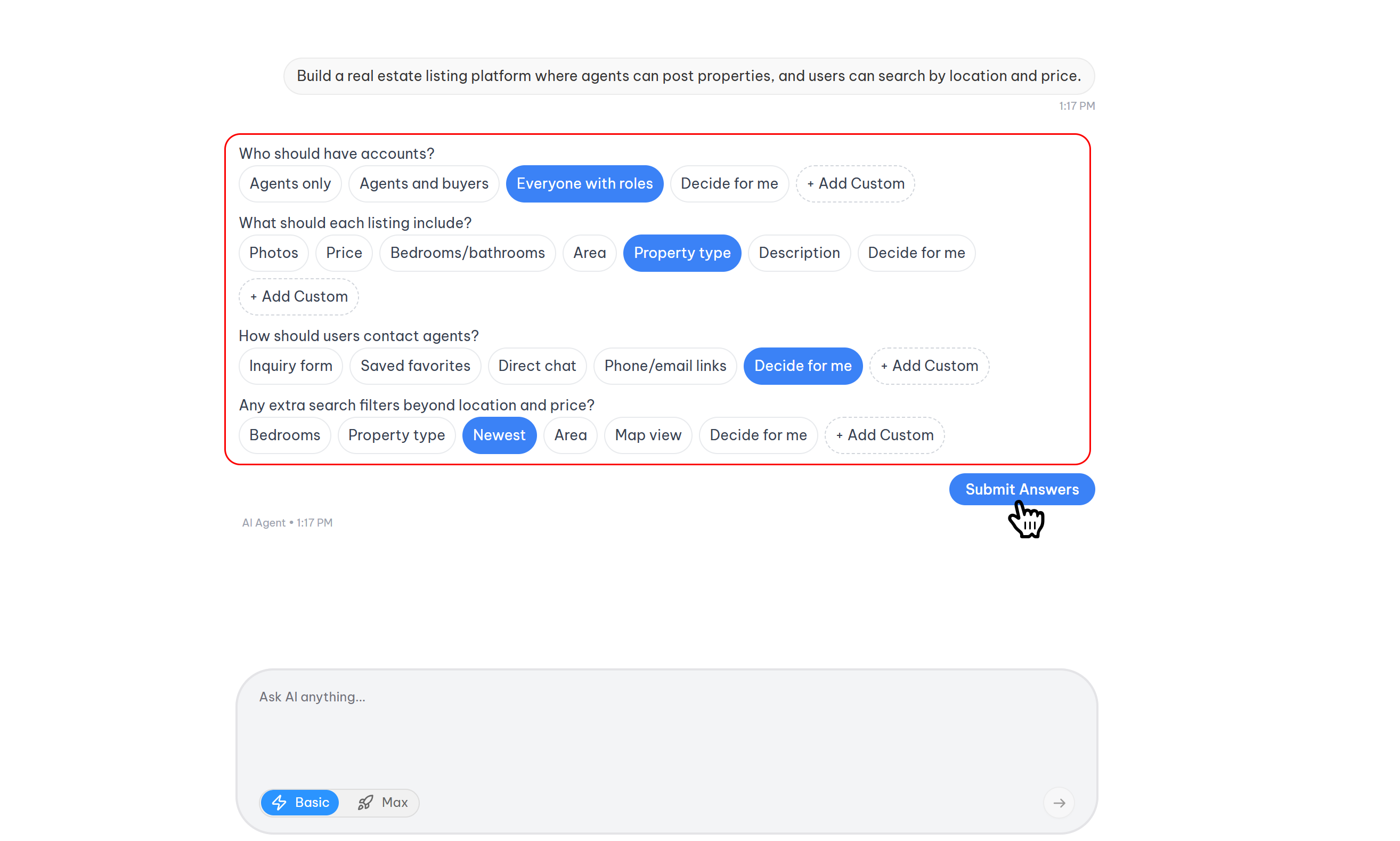
The proposal process is designed to be an interactive, multi-stage conversation between the user and the Craftapp AI. Its goal is to extract sufficient detail to generate a highly relevant and accurate project plan.
1. AI-Driven Interview Phase
To ensure the proposal is tailored to the user's specific vision, Craftapp initiates an intelligent interview process immediately after the initial idea is submitted.
- Dynamic Questioning: The AI presents a series of targeted questions to clarify project goals, target audience, core functionality, and key requirements.
- Flexible User Input: For each question, the user is empowered to:
- Select an AI-Generated Option: Choose from a list of smart suggestions provided by Craftapp.
- Defer to AI: Opt for "Let AI Decide" to allow Craftapp to make an informed recommendation.
- Provide Custom Input: Manually type a specific answer when none of the available options align with their vision.
- Multi-Stage Interviews: For complex projects, Craftapp may dynamically initiate a second or even third round of questions to achieve a deeper understanding before generating the proposal.
2. Initial Proposal Generation
Upon completion of the interview phase, Craftapp immediately synthesizes the provided information into an Initial Proposal. This document serves as a powerful starting point, outlining:
- A proposed Project Name
- A concise Project Description and summary
- A curated list of Recommended Features for the MVP (Minimum Viable Product)
3. Collaborative Refinement & Brainstorming
The proposal page is not a static document; it is a dynamic workspace for collaboration with the AI. Users are encouraged to iterate and refine any aspect of the plan until it is perfect.
- Direct AI Commands: To modify the proposal, users can issue direct commands to the Craftapp AI. For example:
- "Change my project name from SocialConnect to CloseConnect."
- "Update the description to focus on a younger audience."
- "Add a user profile feature to the recommended list."
- Unlimited Brainstorming: This interactive loop allows for as much back-and-forth as needed, ensuring every detail is finalized to the user's satisfaction.
4. Pre-Approval Project Type Conversion
Craftapp provides flexibility even in the final stages of planning. If a user has completed the brainstorming phase for a mobile project but decides a web application would be a better fit, they do not need to start over.
- Seamless Platform Switch: Before final approval, a user can simply instruct the AI, e.g., "I want to make this a web app instead."
- Automated Optimization: Craftapp will automatically refine the entire proposal—including features, architecture, and recommendations—to align with the specifications of the new platform (e.g., Web App).
Technical Architecture
To ensure projects are built on a foundation of scalability, performance, and industry best practices, all mobile proposals generated by Craftapp are standardized on a modern, robust technology stack.
| Layer | Technology |
|---|---|
| Mobile Framework | React Native |
| Backend Framework | FastAPI |
| Database | PostgreSQL |
This stack is pre-configured in the proposal to provide a production-ready, cross-platform foundation, allowing the user to focus on building their unique app logic.
Project Approval & Initialization
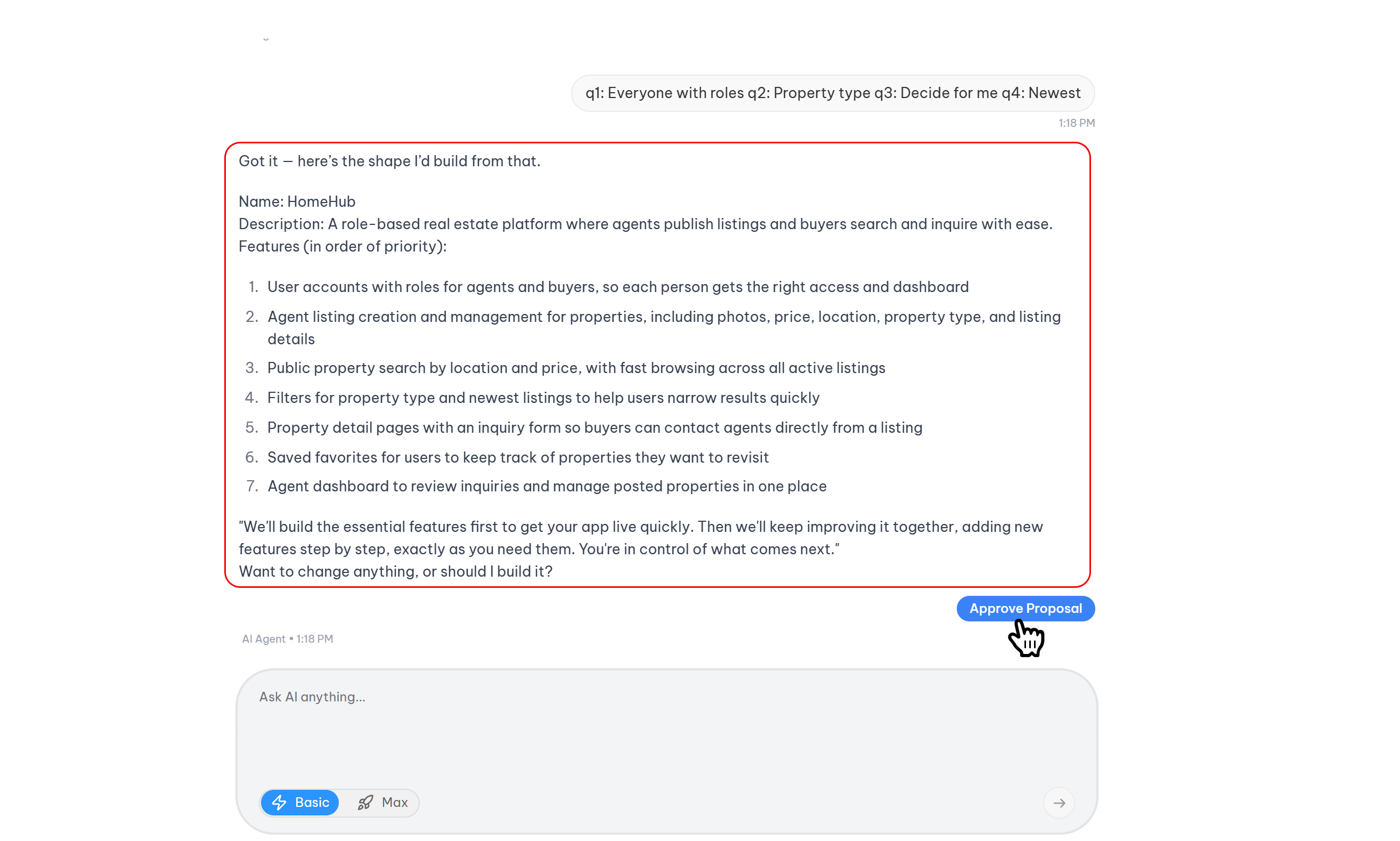
The final step in the proposal process is the formal approval.
- Methods of Approval: Users can approve the project by clicking the Approve button or by providing a verbal approval command to the AI (e.g., "Looks good, approve and create it.").
- Environment Creation: Upon approval, Craftapp immediately begins the process of setting up the user's development environment.
- Redirection to Studio: The user is automatically redirected to the Craftapp Studio, where they will witness:
- Real-time project code generation.
- The environment setup process.
- The full Craftapp visual development interface.
This seamless transition from plan to production marks the official commencement of the app-building journey within Craftapp.