Credits
Credits are the core fuel behind CraftApp's AI-powered building experience.
Every time CraftApp generates code, designs pages, or refactors your application using AI, credits are consumed. CraftApp uses a transparent, deposit-based "pay-as-you-go" system. You simply deposit funds into your account, and the cost of each AI request is deducted from your balance.
How the CraftApp Credit System Works
The system is designed to be simple and transparent:
- Deposit: You purchase a package of credits (e.g., $10, $30, $50), which adds a dollar amount to your account.
- Use: When you make an AI request, the cost of that request is calculated and automatically deducted from your deposit.
- Track: You can monitor your balance and usage history directly from your dashboard.
This ensures you only pay for what you use, with no surprise bills.
Two AI Modes & Their Costs
CraftApp offers two distinct AI models to match the needs of your project. Each mode has different capabilities and costs associated with it.
AI-Powered Generation
Credits are consumed whenever the AI performs meaningful work such as generating pages, backend logic, database schemas, or refactoring multiple files.
Basic Mode
- Good for: General and small tasks, minimal UI changes, and stable logic.
- Cost: Low
- Speed: Reasonable
- Use Case: Ideal for quick fixes, learning, and experimentation.
Max Mode
- Good for: Complex UI design, robust logic, and building large, sophisticated applications.
- Cost: Higher
- Speed: Fast and highly capable
- Use Case: Perfect for production-ready features and complex application building.
Cost Comparison
Max Mode is our frontier flagship model and is approximately 2 to 3 times more expensive than Basic Mode, depending on the request's complexity.
Here is an example of how costs can compare:
| Request | Basic Mode | Max Mode |
|---|---|---|
| "Hi" | $0.02 | $0.04 |
| "Change the stopwatch to Time in landing page" | $0.04 | $0.12 |
| "Change the background color to blue" | $0.03 | $0.13 |
| "Add a static contact page" | $0.05 | $0.15 |
Note
These prices are approximate and for illustrative purposes. The actual cost of a request will vary based on the complexity of the project and the request itself. Manual editing, navigating the dashboard, managing settings, and deploying your app do not consume credits.
Each request you make bellow it's message box you can see it's real time cost as well
Checking Your Balance
To view your credit balance and usage, follow these steps:
- Log in to your CraftApp account.
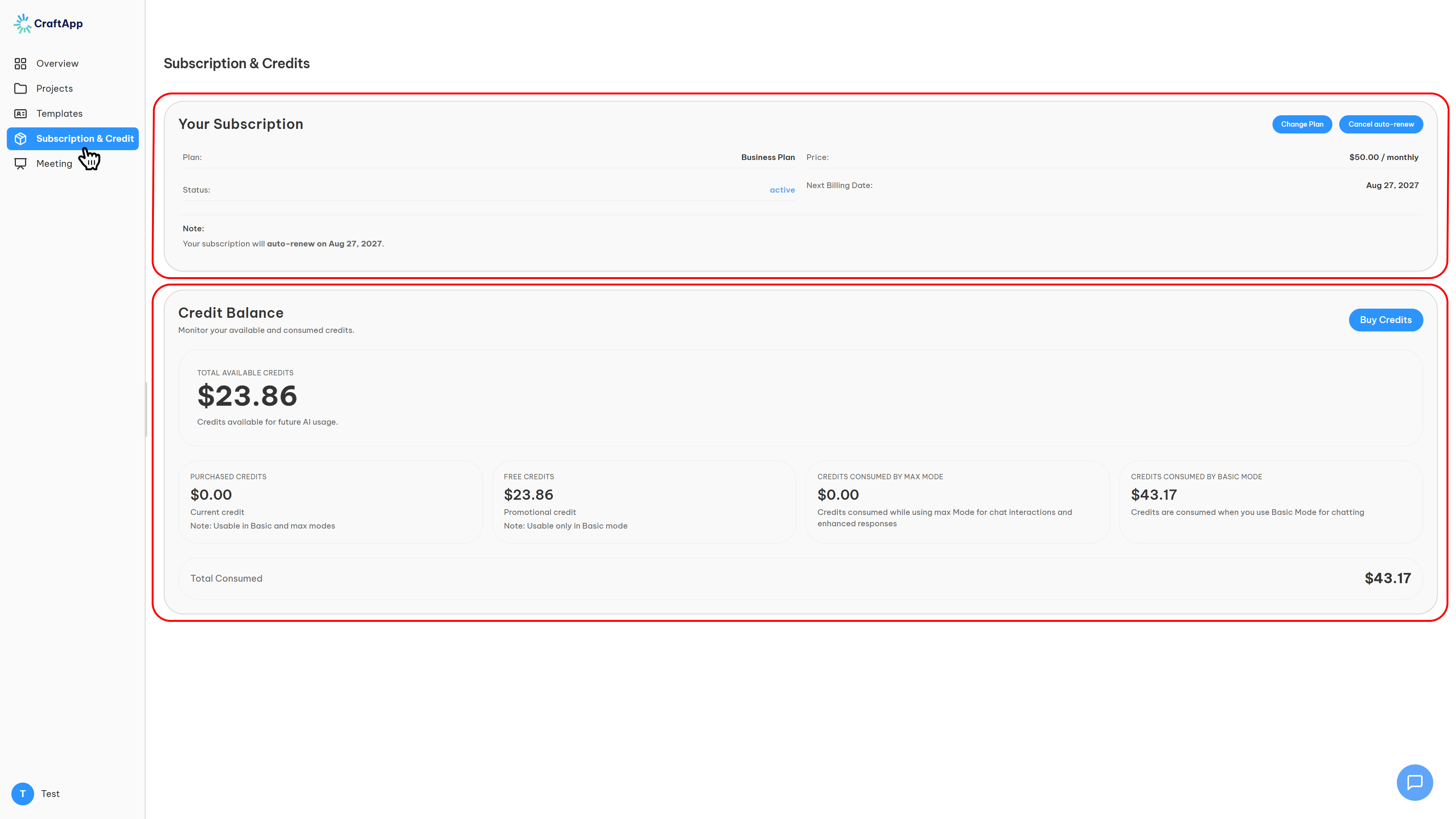
- From the dashboard, navigate to Subscription & Credits.
- On this page, you will find all information related to your account and credit usage:
- Top Half: This section displays the Plan you are currently subscribed to. For detailed information on plans and what they include, visit https://craftapp.ai/pricing.
- Bottom Half: This section contains the Credits box with your detailed balance.
Understanding the Credits Box
The Credits box provides a complete breakdown of your credit status.
- Buy Credits: In the top right corner of the Credits box, you will find a "Buy Credit" button. Clicking this opens the purchase dialog.
- Credit Types: You will see two types of credits in your account:
- Purchased Credits: This is the money you have deposited. You can use these credits for both Basic and Max modes.
- Free Credits: This is a gift from CraftApp (typically $3 to $10). It is provided so you can discover the power of CraftApp and test its features. Free Credits can only be used for Basic Mode.
- Usage Columns: Next to the credit types, you will see two columns showing consumption:
- Credits Consumed by Basic Mode
- Credits Consumed by Max Mode
- Total Consumed: At the end of the page, you will find the Total Consumed amount, which is the sum of credits used across both modes to date.
Purchasing Credits
To add funds to your account (i.e., buy credits):
- In the Credits box, click the "Buy Credit" button.
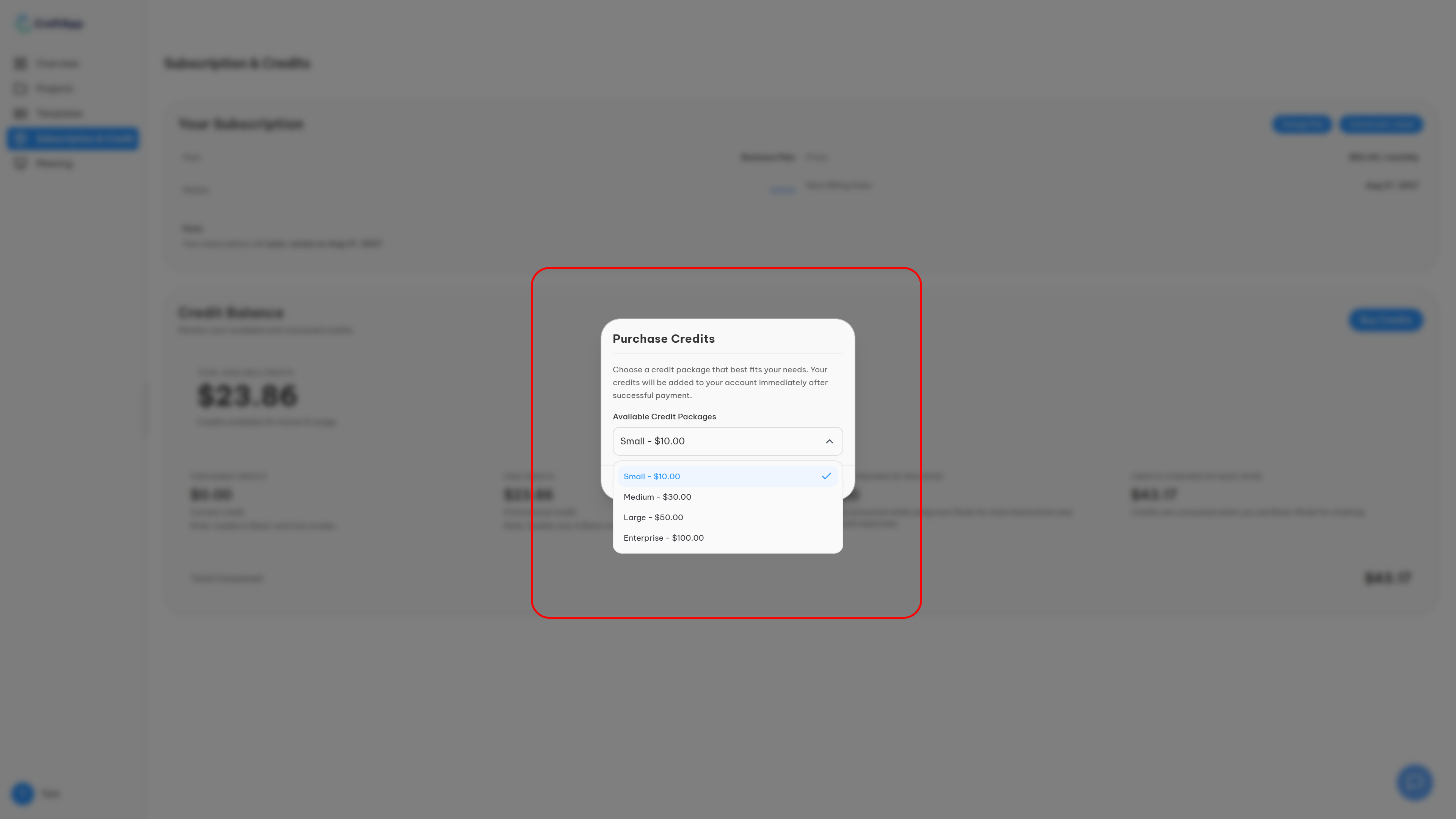
- A purchase dialog will open, offering different packages.
- Choose from the available credit packages:
- Small: $10
- Medium: $30
- Large: $50
- Enterprise: $100
- Click "Continue" to proceed to the payment page.
- Enter your payment details. Once everything is filled in, click "Pay".
- If the transaction is successful, the purchased amount will be added to your Total Available Credits and you will receive a confirmation and invoice via email.
Tip
Top-up credits never expire! This makes them ideal for short bursts of heavy work or upcoming deadlines.
What Happens If You Run Out?
If your credit balance reaches zero:
- AI generation is temporarily paused.
- You will see prompts to purchase more credits.
- Your existing projects and deployments remain active and unaffected.
Need More Credits or a Custom Plan?
Info
For high-volume usage, teams, or enterprise needs, contact us for a custom plan with tailored credit limits and pricing.
Custom Plan Benefits
- Fully customizable credit limits
- Dedicated support
- Custom billing options
- Priority feature requests
Summary
- System: Transparent, deposit-based, pay-as-you-go.
- Credit Types: Purchased Credits (for all modes) and Free Credits (for Basic Mode only).
- AI Modes:
- Basic Mode: Low cost, good for small tasks.
- Max Mode: Higher cost (2-3x Basic), great for complex applications.
- Managing Credits: Track your balance, usage, and purchase top-ups from Dashboard → Subscription & Credits.
- Top-ups: Available in $10, $30, $50, and $100 packages and never expire.
Credits ensure fair, predictable pricing while giving you the power to build with AI. Start free and scale as you grow.