Web Project Proposal
The Web Project Proposal is an AI-driven planning interface within Craftapp Studio, optimized specifically for web application development. It transforms a high-level user concept into a structured, editable blueprint—covering core functionality, branding, design systems, and technical architecture.
This critical step accelerates the product lifecycle, enabling users to move from concept → production-ready project plan in minutes, not weeks.
What Is the Web Proposal?
When a user provides initial requirements for a web application, Craftapp's AI orchestrates a structured discovery process. The result is a complete, actionable project proposal.
This proposal acts as a dynamic baseline that users can review, modify, and approve. It serves as the single source of truth before the system generates the actual codebase and enters the visual builder.
Core Inclusions:
- Project Identity
- Functional Feature Set
- System & Branding Configuration
- Technical Stack Definition
- Directional Design Simulation
The Proposal Workflow
Phase 1: AI-Driven Interview
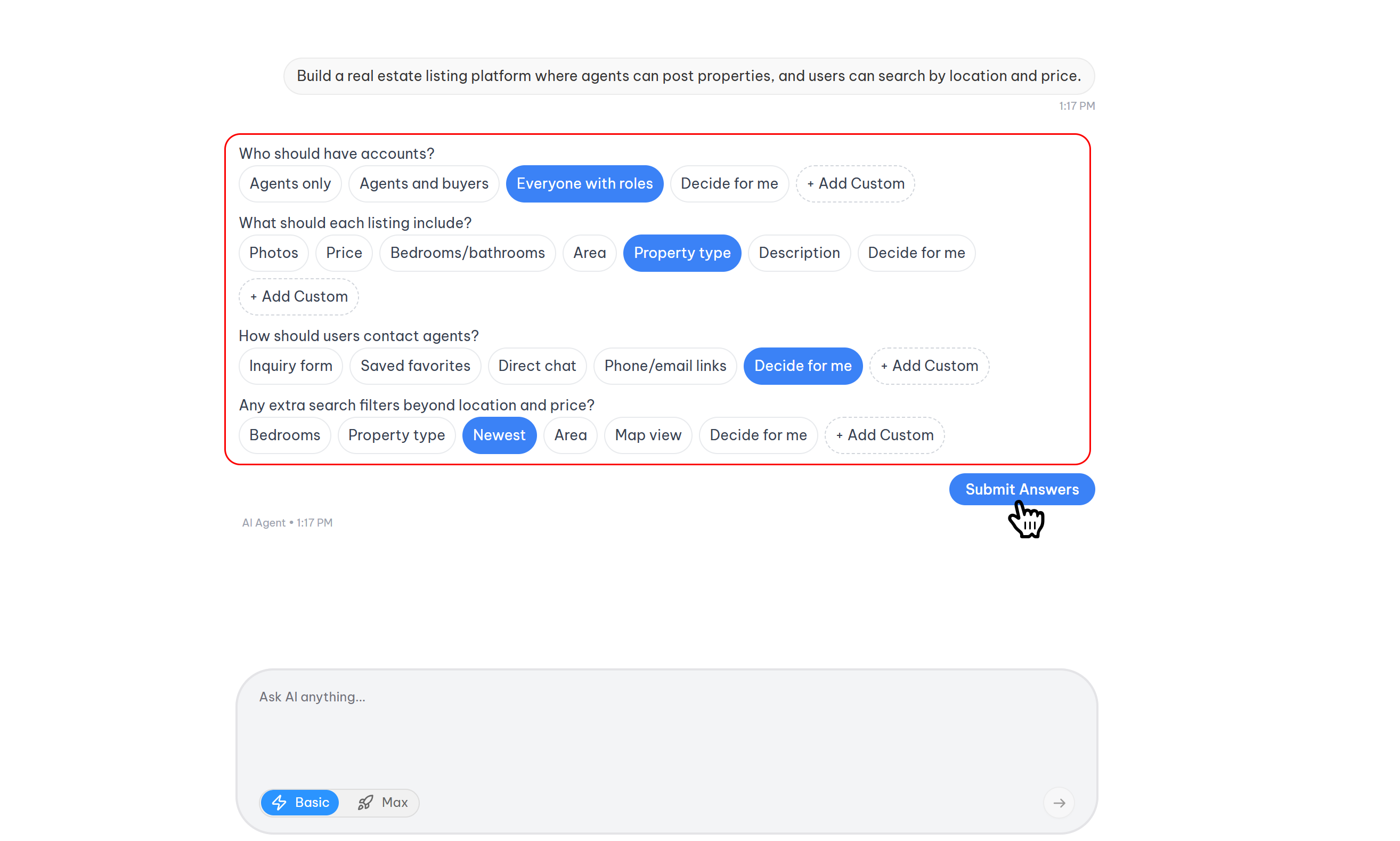
The system does not generate a proposal blindly. It first conducts a structured AI interview to refine the user's idea.
How it works:
- Contextual Questions: The AI presents a series of targeted questions to better understand the project's goals, target audience, and specific requirements.
- User Interaction Modes:
- Select an Option: Choose from AI-suggested answers to speed up the process.
- Defer to AI: Opt for "Let Craftapp decide" to use smart defaults and best practices.
- Manual Input: Type a custom response when the provided options are insufficient.
- Adaptive Depth: For complex project requirements, the AI may execute the interview in multiple phases (e.g., Phase 1 for core functionality, Phase 2 for user roles) to ensure all critical details are captured.
Phase 2: Proposal Generation
Upon completion of the interview phase, Craftapp instantly generates the initial version of the proposal.
- Project Name: An AI-suggested, editable project title.
- Project Summary: An AI-generated description outlining the application's purpose and target audience.
- Recommended Features: A tailored list of modules to be included in the MVP (Minimum Viable Product).
Modifying the Proposal
All data within the proposal page is dynamic and can be modified through Natural Language Text Commands.
- Direct Instruction: Users do not need to navigate away or use complex forms. Simply type instructions to the AI directly within the proposal page.
- Example: "Change my project name from 'SocialConnect' to 'CloseConnect'."
- Example: "Remove the payment integration feature."
- Example: "Add a dark mode toggle to the branding settings."
- Brainstorming Hub: The proposal page acts as a collaborative whiteboard. Users can iterate and refine the scope as much as needed before final approval.
Switching Project Type
Users have the flexibility to change the project type without starting over.
- Scenario: If a user begins a proposal for a mobile app but decides mid-way that a web application is more suitable, they can simply type: "I want this to be a web project instead of mobile."
- Result: Craftapp will automatically re-optimize the entire proposal—adjusting features, technical stack, and design logic to align with web development standards. This ensures the final output is perfectly tailored for the web platform.
Sections of the Proposal
Project Information
- Project Name: Editable title for the application.
- Summary: A concise, AI-generated description of the project's purpose and target audience.
Recommended Features
Craftapp suggests a set of smart feature modules based on the project type and interview responses. These modules form the functional building blocks for pages, database schemas, and business logic.
- Example Modules: User authentication, data dashboards, CMS integration, third-party APIs, and notification systems.
- User Controls: Users can review, add, or remove features to precisely define the project's scope.
Branding & System Configuration
-
Design & Branding: The AI proposes a base design system to ensure visual consistency.
- Includes: Primary, secondary, and accent colors, neutral palettes, and logo upload.
-
Tech Stack: Craftapp implements a modern, scalable architecture for web development.
| Layer | Technology |
|---|---|
| Frontend Framework | Next.js |
| Backend Framework | FastAPI |
| Database | PostgreSQL |
Design Simulation
A directional UI mockup generated by AI to provide a visual preview of the layout. It serves as a design starting point to be refined in the visual builder.
Final Actions
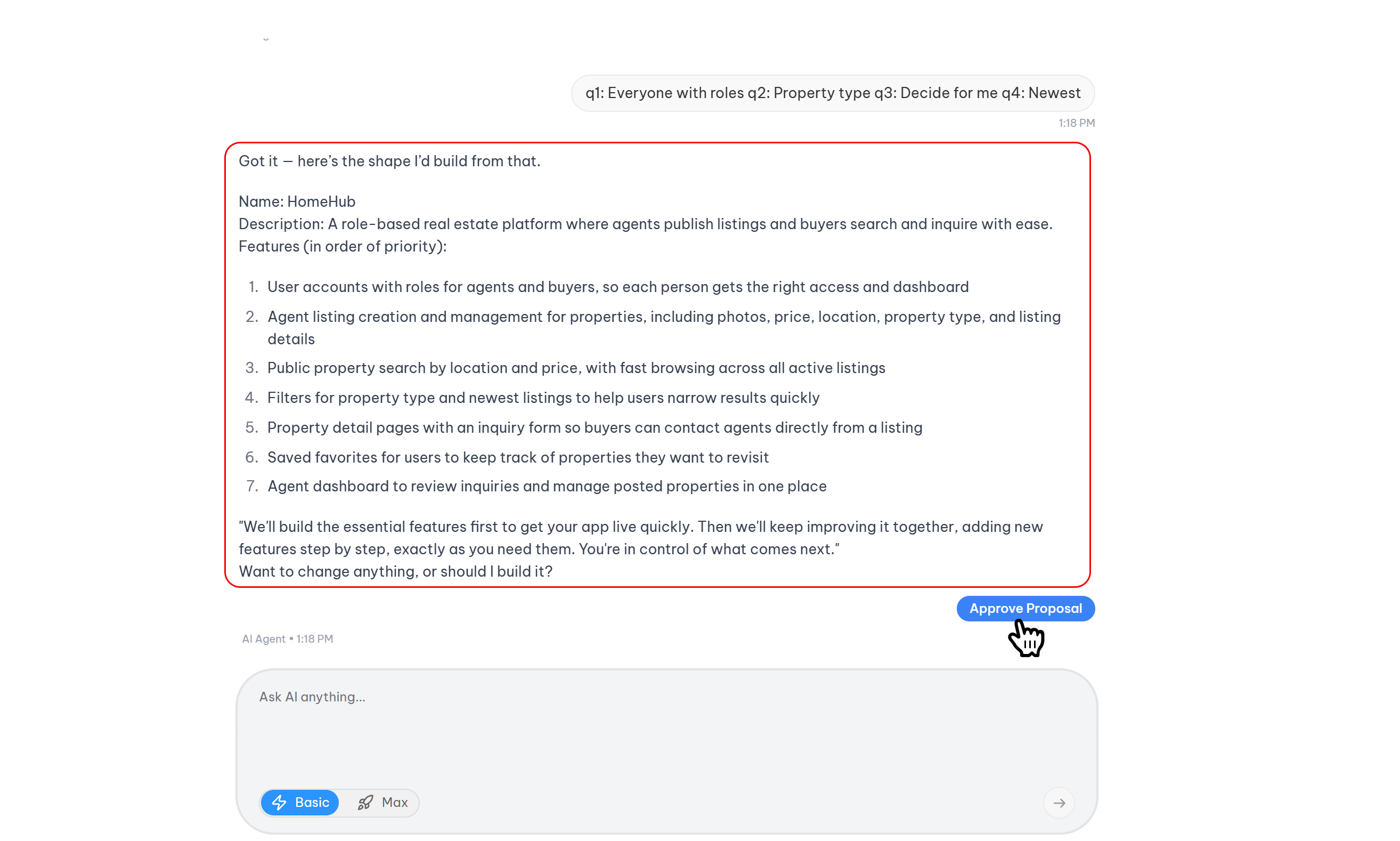
At the bottom of the proposal screen, users can approve or cancel the plan.
Cancel Proposal
Discards the generated plan and returns the user to the idea entry stage.
Approve & Create Project
Finalizes the proposal and triggers the generation of the project environment.
- Text Command Approval: Users can click the Approve button or type a command like, "Looks good, create it for me."
- Environment Generation: Craftapp will:
- Create the project structure.
- Scaffold pages and modules.
- Configure the design system.
- Generate the codebase.
- Redirect: The user is taken directly into Craftapp Studio to witness the code generation and environment creation, and begin customization.